Private beta · Workshop assistant
Describe a machine and what it must do. Haviland designs the 3D-printable parts, writes the Arduino code and checks the whole build before you print a thing.
Runs locally
Asks before touching hardware
Windows & macOS
Session · Rover
On this computer
You
A rover that stops before it hits anything.
Haviland
Parts
Ten, on one printed plate
Firmware
Compiled. Motors capped at 196/255.
Requirements
4 of 4 met, in simulation
Unchecked
1: a second physics model isn’t installed
Gate verdict
Fail · 0 errors · 1 unchecked
It won’t round “unmeasured” up to “fine”. Simulated; nothing here has met a real floor yet.
Drives the tools you already use
Claude
OpenSCAD
Blender
arduino-cli
whisper.cpp
git

001
Process
How it builds a machine.
Five steps, on a real machine: a rover that stops before it hits anything. Scroll to follow it.
002
case study
What it built, and what it caught.
Every time the gate said no, it said why. This is the rover’s log.
To stop
68
mm
simulated
On six AA cells
2.4
h
calculated
Requirements met
4
of 4
verified in simulation
Errors at the gate
0
1 unchecked, so still FAIL
Less sure to more sure: assumed, sourced, calculated, simulated, measured, validated. Nothing here is measured yet.
Case study · Rover
A rover that stops before it hits anything.
Ten parts on one printed plate, designed, wired, programmed and checked by Haviland. Four times the gate said no, and each time it said why.
01
Fail
02
Fail
03
Fail
06
Fail
All four requirements pass in simulation. Nothing here has met a real floor yet.
003
what it does
Parts, firmware, and the proof.
What it makes, and the two rules that keep it honest about what it knows.


Not sure where to start? Say one sentence.
Try “a quiet desk fan that stops when nothing is in front of it.”
Haviland takes it from there: the parts, the firmware and a check of the whole build.
Kept on your machine.
Four rules it keeps while it works.
Runs locally
Answers only itself
Refusals survive a yes
Every change undoable
004
why haviland
An engineer that shows its work.
It checks its own work, asks before it acts, and keeps your projects on your own computer.


005
built on
The tools it drives.
Haviland doesn’t replace your engineering tools. It runs them for you, and checks what they make.
Haviland · on your computer
T-01
Claude
Does the thinking
T-02
OpenSCAD
Parts with exact dimensions
T-03
Blender
Organic shapes
T-04
arduino-cli
Compiles; uploads when you allow it
T-05
whisper.cpp
Hears you, on your own computer
T-06
git
A history for every project
01
What does it run on?
Your own computer, on Windows or macOS. It drives the tools you’d use anyway: OpenSCAD and Blender for parts, arduino-cli for firmware.
02
Does it need the internet?
Yes, for its thinking: Haviland runs on Claude. Your projects, their files and their history stay on your disk.
03
Who can use it?
Adults. Haviland runs on Claude, and Claude accounts are for people aged 18 and over. The beta is invite-only for now.
04
Can it flash my board on its own?
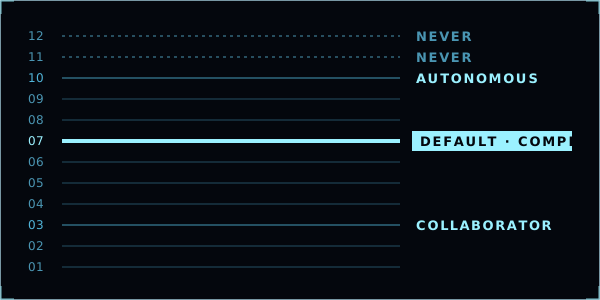
Not by default. Its default mode stops at compiling, and a yes buys exactly one rung for one turn. A mode that can flash exists, and you switch it on deliberately. No mode drives instruments or machines.
05
What can’t it do yet?
Circuit-board layout and circuit simulation. Both are on the roadmap. Until they’re real, this page won’t claim them.
007 · Invite
Invite-only beta